Chrome Extension Available now
Alt text that sees
what you see.
Right-click any image on the web — including CSS background images, Pinterest, and WordPress — and get accurate, considered alt text instantly. No tabs, no forms, no guessing.
Add to ChromeHow it works
Right-click any image
Works on img tags, CSS background images, Pinterest, WordPress, and the tricky ones most tools miss. If it's visible on the page, we can read it. And if the page is in French, Japanese, or Chinese, your alt text comes back in that language too. Automatically.
Select Generate Alt Text
One click from the context menu. No popup, no form, no friction. Choose your tone — editorial, conversational, technical, or marketing — and get the description that fits your context, not just the image.
Copy and go
The result appears right on the page. Review it, copy it, paste it where it needs to live. Ten seconds, start to finish.
The same image.
Five different voices.
Alt text isn't just description. It's context. Choose a tone and see how Panopt adapts to your work.

Generated alt text
It also speaks your language.
Right-click on a French page, get French alt text. English, Japanese, Chinese, Portuguese — Panopt reads the page you're on and responds in kind. No settings, no toggles, no extra steps.
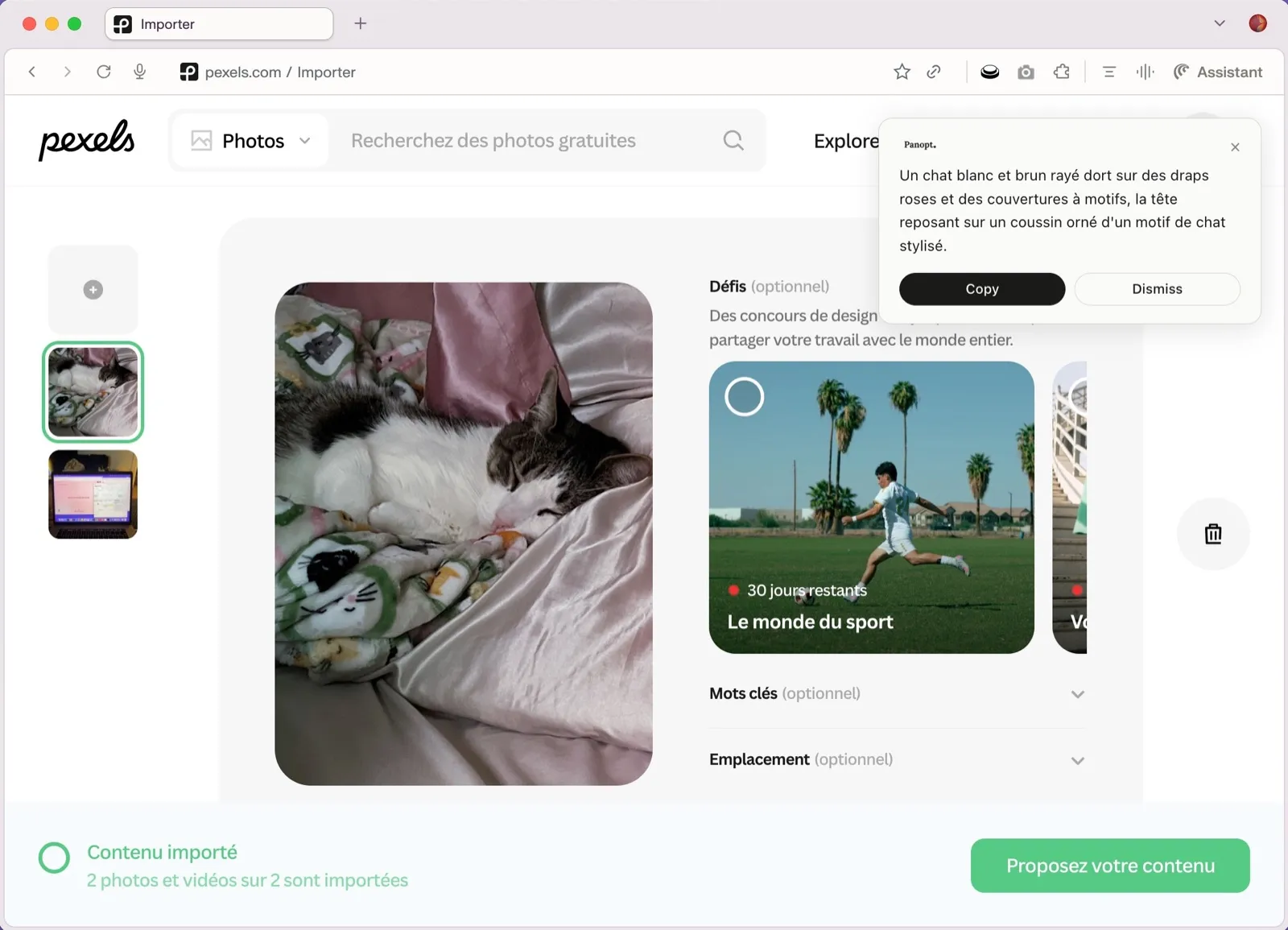
Pexels · Français
Un chat blanc et brun rayé dort sur des draps roses et des couvertures à motifs, la tête reposant sur un coussin orné d'un motif de chat stylisé.
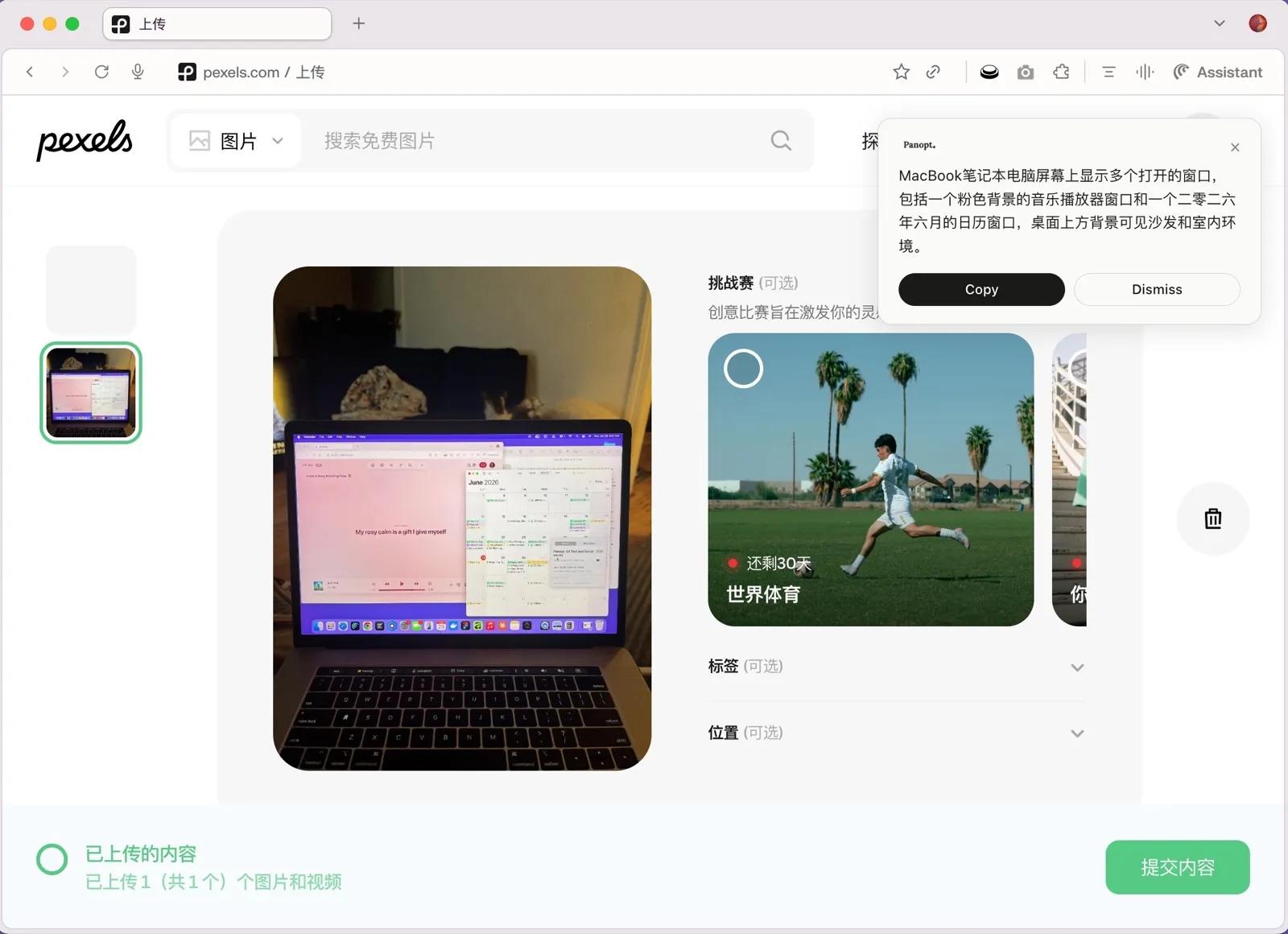
Pexels · 中文
MacBook笔记本电脑屏幕上显示多个打开的窗口,包括一个粉色背景的音乐播放器窗口和一个二零二六年六月的日历窗口,桌面上方背景可见沙发和室内环境。
Most alt text gets written fast and forgotten. A screen reader user encounters it and gets "image.jpg" — or worse, a string of SEO keywords dressed up as a description.
We built this because alt text is the only way some people experience your images. It should actually tell them something.
Taste includes accessibility.
Pricing
One credit, one image. Credits never expire. No subscription, no monthly pressure. Buy what you need, use it when you need it.
- 50 alt text generations
- Never expires
- Priority support
- 200 alt text generations
- Never expires
- Priority support
- 500 alt text generations
- Never expires
- Priority support
Frequently asked questions
What browsers does Panopt work with?
Right now Panopt is a Chrome extension. Firefox and Edge support is on the roadmap.
Is there a Firefox or Edge extension?
Not yet — Panopt is live on Chrome, and Firefox and Edge are what we're working on next. Add your browser to the list and we'll let you know as soon as support lands.
What kinds of images does it support?
Most tools only read standard <img> tags. Panopt also handles CSS background images and images embedded inside complex layouts — the kinds that trip up every other alt text generator.
Does it work on every website?
Almost. The image needs to be publicly accessible for our AI to read it. Images behind a login — private dashboards, intranets, password-protected staging sites — can't be reached yet, and you'll see a clear message when that happens. Support for protected images is on our roadmap.
Do credits expire?
Never. Credits you buy are yours to use at whatever pace works for you. There's no monthly reset, no pressure to use them up.
How accurate is the generated alt text?
Very good — but not perfect. The AI describes what it sees, which is usually exactly what you need. For images where context matters (charts, screenshots, culturally specific content) we recommend a quick review before publishing.
What happens to the images I process?
Images are sent to our servers, forwarded to the AI model, and then discarded. We do not store, log, or train on any image you submit. See our Privacy Policy for the full details.
Can I use this for my whole team?
Team accounts aren't available yet, but they're coming. For now each team member can sign up individually. Reach out if you need something custom.